PeerProxy - A WebRTC Proxy for HTTP
Master’s Thesis Overview
PeerProxy is a framework for accessing self-hosted web services without manual router configuration, third-party proxy infrastructure, or sacrificing privacy. It leverages WebRTC to create encrypted peer-to-peer connections and moves HTTP requests across those connections using a lightweight custom protocol.
Why this matters
Self-hosting services like personal websites or smart home dashboards often requires port forwarding and network expertise. In practice, many ISPs restrict these configurations, and users end up relying on proxy vendors (Ngrok, Cloudflare Tunnels, etc.) that introduce cost and privacy tradeoffs. PeerProxy asks: can we get the simplicity of a hosted proxy without giving up control?

The core idea
WebRTC already solves the hardest networking problems: NAT traversal, encryption, and peer discovery. PeerProxy builds on that foundation by carrying HTTP messages over WebRTC data channels.
At a high level:
- A local proxy server receives standard HTTP requests.
- A browser client establishes a WebRTC connection and loads web apps without modifying the browser.
- A signaling server coordinates connection setup between peers.
- A custom packet protocol packages HTTP requests and responses over the data channel efficiently.
The browser client is what makes the project interesting from a web systems perspective. Instead of requiring a custom browser, PeerProxy uses a normal web application that runs in an unmodified browser. Inside that client, a connection manager handles WebRTC signaling and transport, a sandboxed iframe isolates the proxied page, and a service worker intercepts requests and routes them through the peer connection.
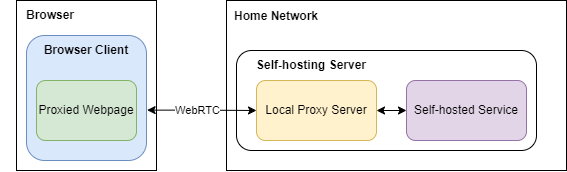
System overview
The high-level diagram is really showing three layers of responsibility.
- The browser client runs in the remote user’s browser and hosts the proxied webpage.
- The local proxy server runs on the same machine or local network as the self-hosted app.
- The self-hosted service is the actual website or application being exposed.
The key detail is that the webpage is not fetched directly from the self-hosted service in the normal browser networking path. Instead, the browser client acts as a controlled environment that loads the proxied page and sends its network activity over WebRTC to the local proxy server.
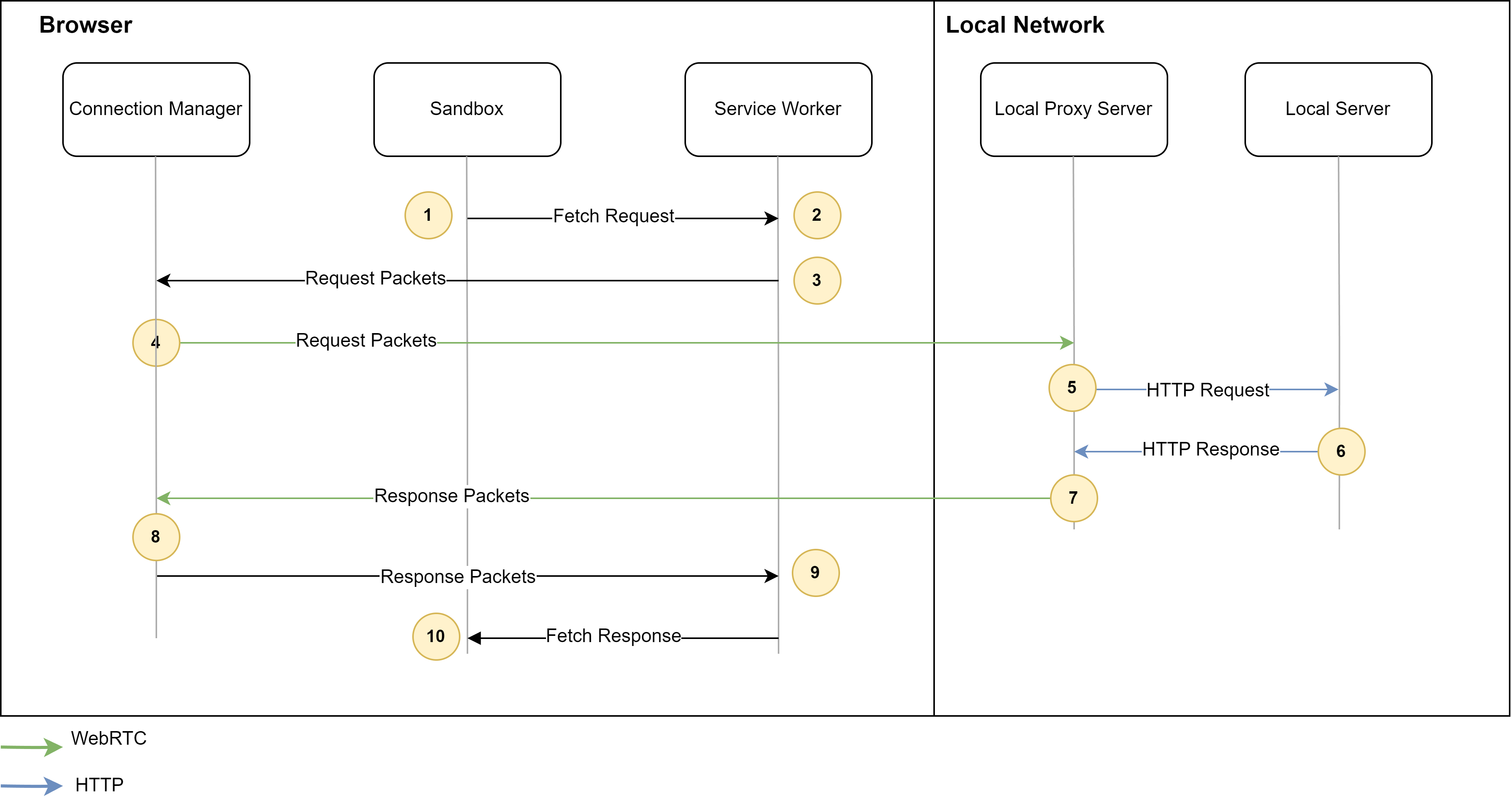
A more accurate request flow looks like this:
- The remote user opens the browser client.
- Inside that client, the proxied webpage runs in the sandbox and makes a request for a page, script, image, or API resource.
- The browser client’s service worker intercepts that request instead of letting the browser send it normally over HTTP.
- The request is serialized into PeerProxy packets and forwarded through the browser client’s WebRTC connection.
- The local proxy server receives those packets, reconstructs the HTTP request, and forwards it to the self-hosted service.
- The self-hosted service sends back a normal HTTP response to the local proxy server.
- The local proxy server serializes the response back into PeerProxy packets and streams them over WebRTC to the browser client.
- The browser client reconstructs the response and delivers it back to the proxied webpage as if the request had completed normally.
So the WebRTC link in the diagram is not replacing the self-hosted service itself. It is replacing the network path between the remote browser environment and the local proxy that sits in front of the service.
Evaluation (high level)
PeerProxy was evaluated against traditional proxy performance. Results show:
- Latency is comparable to standard proxies for very small responses up to about 1 KB.
- Throughput is lower (about 2.6 MB/s) versus traditional proxies (about 14.08 MB/s), largely due to WebRTC limitations.
- Resource overhead is minimal in the browser client.
- Placement matters: PeerProxy can outperform a centralized proxy when that proxy is deployed far from the user or the hosted service.
These results suggest PeerProxy is viable for many interactive web workloads, especially when requests are small and latency to centralized infrastructure is high. For larger payloads and bulk transfers, current WebRTC data channel performance is a clear limitation.
The main bottleneck is not just “WebRTC is slower” in the abstract. The thesis found that browser WebRTC data channels are constrained by the current SCTP implementation, including limited send and receive windows and congestion control behavior that favors responsiveness over high throughput. In practice, that means PeerProxy can keep small interactive requests feeling reasonable while still falling behind TCP-based proxies on sustained large transfers.
There is also a connection setup cost. Establishing the WebRTC session adds roughly 482.8 ms in optimal conditions and can exceed 1 second in more realistic scenarios. That overhead is an important tradeoff compared with a conventional TCP-based proxy.
Limitations and future work
PeerProxy’s performance is bounded by WebRTC’s current data channel implementation. Emerging work like RTCQuicTransport could significantly improve throughput and reliability, making peer-to-peer HTTP transport more competitive with traditional proxies.
The current prototype also has browser compatibility limits that matter in practice. A proxied application cannot rely on service workers or same-domain iframes, and the current design does not fully support cookies or same-domain WebSockets. Those constraints mean PeerProxy works best today for a narrower class of web apps than a standard reverse proxy.
Read the full thesis
If you’d like more details on design, implementation, and evaluation, the full thesis is embedded below.